

Artificial intelligence (AI) is technology that lets computers perform tasks that normally need human thinking, like understanding language, recognizing patterns, and making decisions. You might have heard names like ChatGPT, Claude, or Gamma thrown around, but what exactly are these tools and how do they fit into the bigger AI picture?
ChatGPT is OpenAI’s conversational AI that can write, answer questions, and help with coding. Claude is Anthropic’s AI assistant known for handling long documents and complex instructions. Gamma is a presentation creation tool that uses AI to help you build slides and content.
Each of these tools takes a different approach to helping you work smarter. ChatGPT offers the broadest feature set with image generation and voice modes. Claude excels at following detailed instructions precisely. Gamma focuses specifically on making presentations easier, as well as creating/generating images.

Understanding different AI tools helps you pick the right one for your needs. Leading AI models like ChatGPT, Claude, and others each have unique strengths that make them better suited for specific tasks. Whether you need help writing, coding, analyzing documents, or creating presentations, knowing what each tool does best saves you time and frustration.
I’m going to be honest with you – initially, I was COMPLETELY against AI.
The way that AI data centers affect the environment, are located in rural areas or near the less fortunate, and the way folks immediately started replacing people on the job with AI tools just became too much to handle. After being unemployed for a year post-layoff, then I felt compelled to dive into AI tools when my next job made a turn to become and AI forward company.
I felt forced to use AI tools. I still have a love/hate relationship with AI, so I don’t rely on AI tools, but I have found them insanely helpful and efficient with getting ish done!
Artificial Intelligence Explained
AI represents software systems that can recognize patterns, learn from data, and perform tasks that typically require human intelligence. In nearly every instance, AI tools perform tasks much faster than a human. Modern AI has evolved from simple rule-based programs to sophisticated models that power everyday tools like map apps, fraud detection systems, and conversational assistants.
Defining AI and Its Evolution
Artificial intelligence enables computers and machines to simulate human learning, comprehension, problem-solving, and decision-making. When you interact with a customer support chatbot or notice your bank flagging an unusual purchase, you’re experiencing AI in action.
AI is a broad category, not a single tool. Within this field, you’ll find models. These models are trained systems that learn from data and apply what they’ve learned to new situations. Some models specialize in speech recognition, others in visual analysis, and some in forecasting future trends.
The technology has transformed dramatically over recent decades and even more in the last 2-3 years. Early AI systems followed rigid, pre-programmed rules. Modern AI learns patterns from massive datasets, adapting its behavior based on what it observes. This evolution became possible through advances in computing power, improved training methods, and access to larger amounts of data.
Current Trends in Machine Learning
Machine learning (ML) forms the foundation of most AI applications you encounter today. ML systems improve their performance by analyzing examples rather than following explicit instructions for every scenario.
You’re seeing ML trends emerge across multiple areas:
- Automated decision-making in healthcare diagnostics and financial services
- Personalization engines that customize content recommendations
- Predictive analytics for business forecasting and resource planning
- Computer vision for image recognition and autonomous systems
The shift toward open-source AI models has accelerated innovation. Developers can now access pre-trained models and customize them for specific needs. This allows smaller organizations to build AI-powered applications without starting from scratch.
Large Language Models and Their Role
Large language models (LLM) are AI models designed to work with human language. These systems learn patterns from vast amounts of text, enabling them to generate, transform, and understand language in useful ways.
An LLM doesn’t “know” information like you do. Instead, it predicts likely text based on patterns it observed during training.
Different large language models serve different purposes. Some prioritize speed for straightforward tasks like drafting emails or summarizing documents. Others focus on deeper reasoning for complex problem-solving that requires multiple steps.
Spotlight on ChatGPT
ChatGPT is OpenAI’s conversational AI that can write essays, debug code, and answer questions through natural dialogue. It offers multiple versions with different capabilities, connects with other services, and raises important questions about data handling.
Origins and Core Features
OpenAI launched ChatGPT in late 2022 as a chatbot trained using Reinforcement Learning from Human Feedback. The system uses a dialogue format that lets it answer follow-up questions, admit mistakes, and reject inappropriate requests.
You can access different versions depending on your needs. The free tier uses older models, while paid subscriptions give you access to more advanced versions. Each model comes with a context window that determines how much text it can process at once.
The platform handles various tasks, including coding help, explanation of complex topics, and translation. ChatGPT can also generate images when you describe what you want to create. The AI tools remember your conversation history within a single chat, which helps maintain context as you ask related questions.
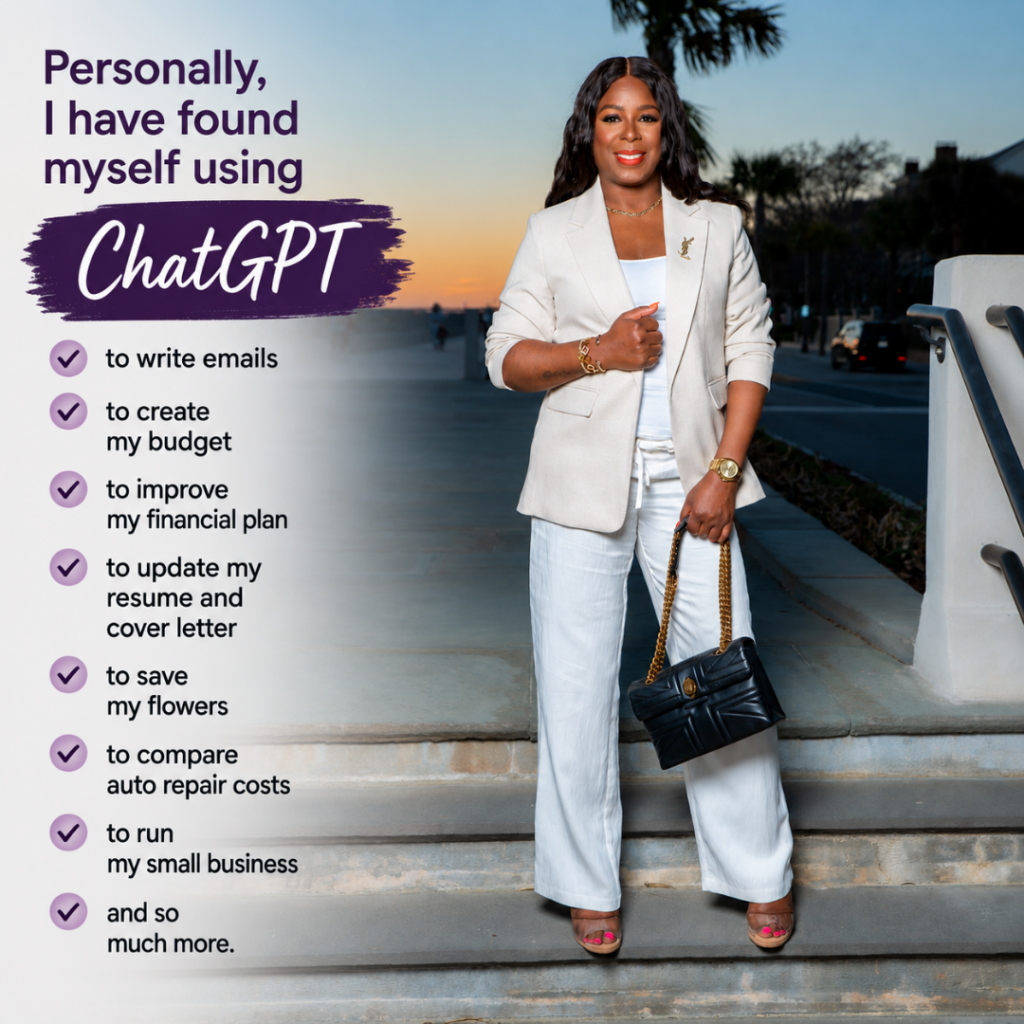
Personally, I have found myself using ChatGPT to write emails, create my budget, improve my financial plan, update my resume and cover letter, save my flowers, compare auto repair costs, run my small business, and so much more.
Creative Writing and Practical Applications
ChatGPT excels at creative writing tasks like drafting stories, poems, and marketing copy. You can ask it to write in different styles or tones to match your needs.
For practical work, you can use it to summarize long documents, create outlines, or brainstorm ideas. Many professionals use ChatGPT to draft emails, create presentation content, or generate product descriptions. Students and researchers find it helpful for explaining difficult concepts or organizing research notes.
Data Privacy and Limitations
OpenAI uses your conversations to improve its models unless you opt out in settings. This raises privacy concerns for anyone sharing sensitive information. You should avoid entering personal details, confidential business data, or private health information.
Data privacy settings let you control whether your chats get used for training. You can also delete your conversation history, though OpenAI may retain some data for safety monitoring.
ChatGPT sometimes produces incorrect information presented with confidence. It can’t access real-time data unless connected to the internet through specific features. The system may refuse appropriate requests or fail to catch harmful ones. You need to verify important facts rather than trusting outputs blindly.
Understanding Claude and Claude AI
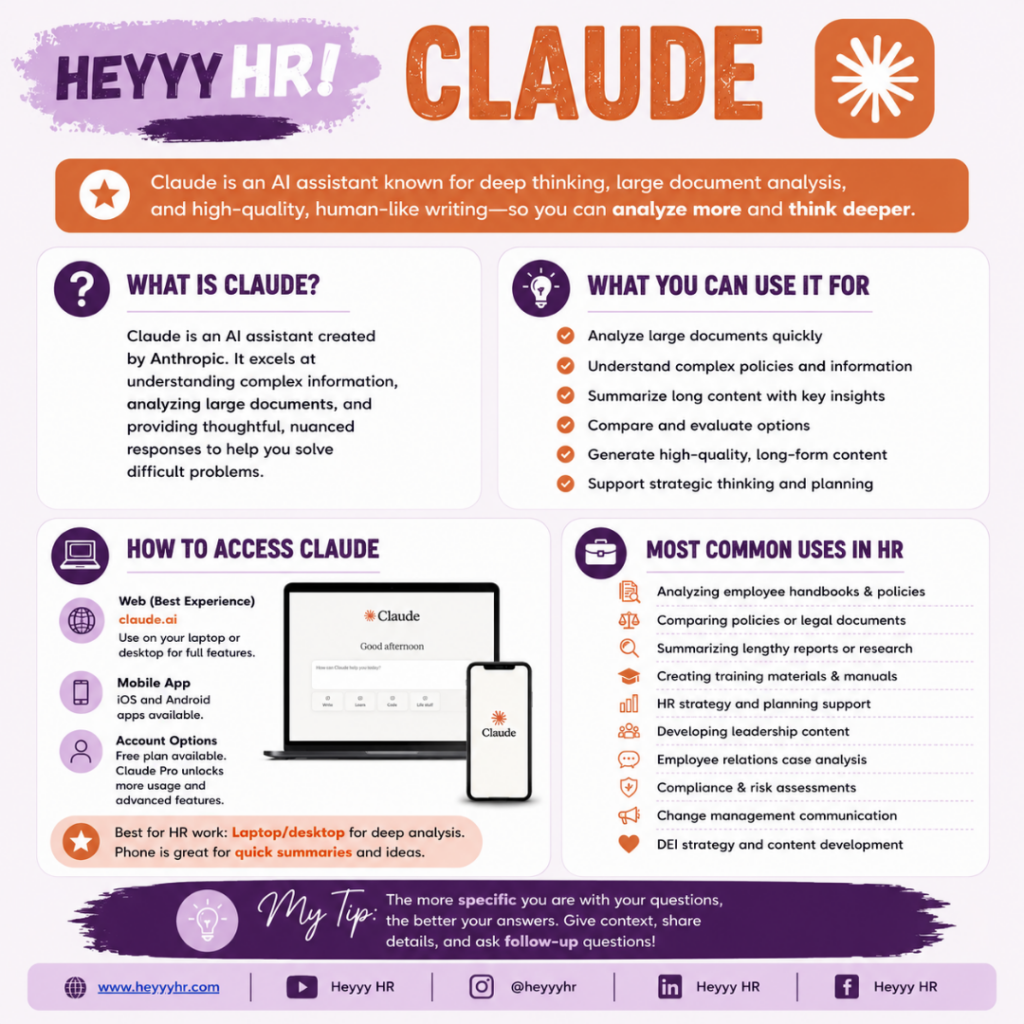
Claude is an AI chatbot developed by Anthropic that can write, code, conduct research, and hold conversations. The system uses AI training to maintain ethical guidelines while offering varying use cases.
 Development by Anthropic
Anthropic created Claude as a series of large language models released in March 2023. The company is an AI safety and research firm focused on building reliable AI systems.
Claude is named after Claude Shannon, a mathematician who founded information theory.
You can access Claude through the web interface at claude.ai or through API integration. There’s no shock that Claude comes at a price.
Anthropic offers multiple subscription plans, including a free tier, Claude Pro, and Claude Max with higher usage limits.
Key Features and Unique Strengths
Claude analyzes text, audio, and visual inputs to answer questions, summarize documents, generate content, and write code. The system handles multiple tasks within single conversations.
Claude 2.1 introduced a 200,000-token context window, which equals around 500 pages of material. This lets you work with longer documents and maintain context across extended conversations.
So far, I’ve primarily used Claude in the workplace and not on a personal level. I doubt I will use it on a personal level because it really performs so well as a professional tool. I’ve been able to use it in various ways while at work.
I’ve worked with our Training Team to create a comprehensive training program that included an agenda, real-time quizzes, study notes, presentations, outlines and so much more. I’ve used it for headcount analysis and forecasting (to determine how many people need to be hired, when we need to hire them, and how much it will cost). I’ve also used it to estimate commission payouts for our sales team. I’ve used it to analyze recruiting data to determine which recruiting tools are worth their costs. I’ve also used Claude to create shorter versions of our benefits guide to share during the interview and pre-hire process and so much more.
I’m not the type of girl to work with code, which explains why I’m an HR professional and not a developer. The ironic thing is that I’ve seen others who are even more removed from coding able to use Claude to create code and unique websites, interactive interfaces, and the like.

Notable features include:
- Artifacts for generating and interacting with code snippets
- Computer use capability to navigate desktop environments
- Web search functionality added in 2025
- Claude Code for developers working from the command line
Claude Code became particularly popular during late 2025, attracting both programmers and non-technical users for various coding tasks.
Ethical AI and Privacy Controls
Anthropic trains Claude using constitutional AI, a technique designed to improve ethical and legal compliance. This approach uses a written constitution to guide Claude’s behavior without relying heavily on human feedback.
The 2026 version expanded to 23,000 words from 2,700 words in 2023, providing detailed explanations for intended behavior.
Anthropic maintains strict privacy controls and usage restrictions. The company refused to remove contractual prohibitions on using Claude for mass domestic surveillance and fully autonomous weapons. This decision led to conflict with US federal agencies in 2026.
You retain control over what data Claude can access. The system processes your inputs to respond but follows clear boundaries set by Anthropic’s guidelines.
Gamma and Its Role in AI Collaboration
Gamma brings AI-powered visual creation into team workflows through built-in sharing features and compatibility with other AI tools. The platform helps groups work together on presentations and documents while connecting with popular AI assistants to expand what teams can create.
Overview of Gamma’s Collaboration Features
Gamma provides AI-powered visual storytelling that turns text into presentations, documents, websites, and marketing materials you can share with your team. You can invite team members to view and edit projects in real-time. The platform stores your work in the cloud so everyone can access the latest version.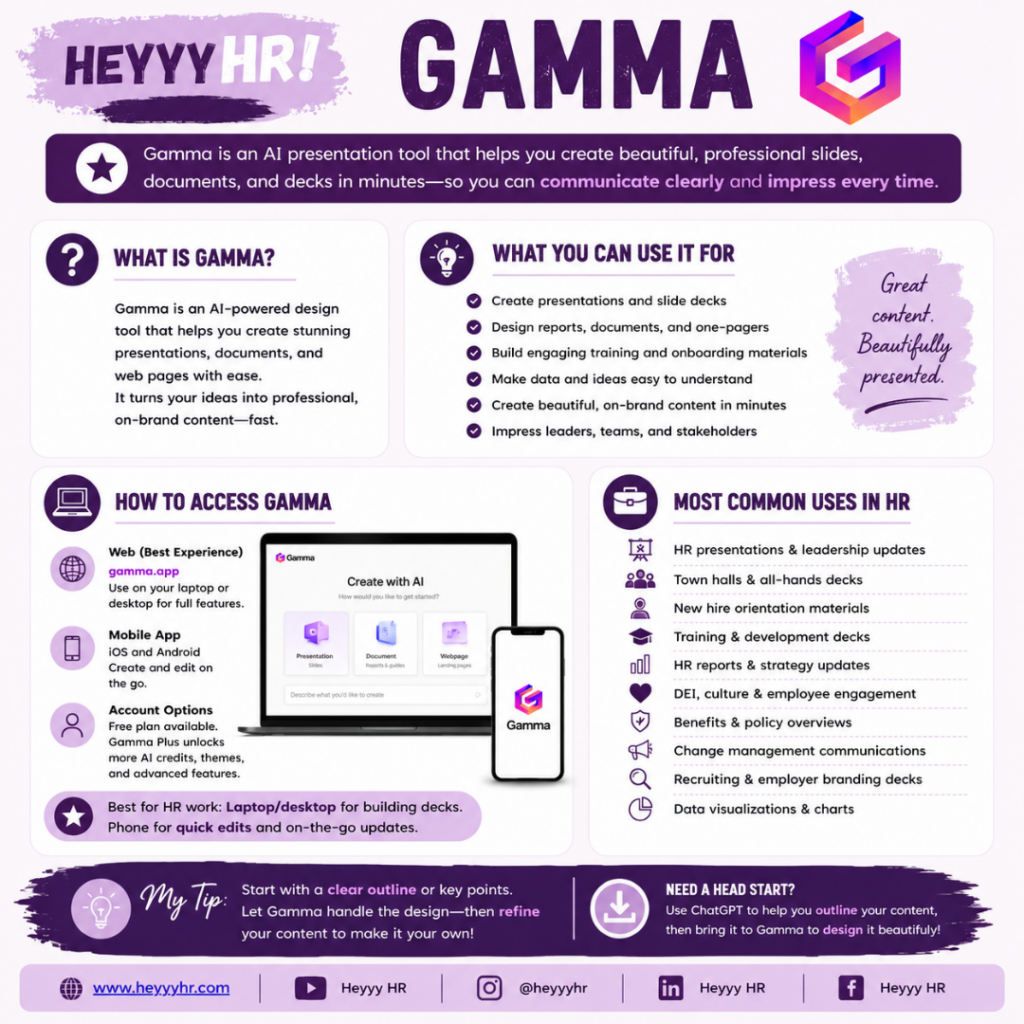
You can leave comments on specific slides or sections for feedback. Team members receive notifications when changes happen or when someone mentions them. The version history feature lets you track edits and restore earlier versions if needed.
Gamma also offers template libraries that teams can customize and reuse. You save these templates for consistent branding across all your team’s presentations and documents.
In my professional life in my corporate office, I’ve found myself using it to present recruiting updates during regular HR meetings and HR leadership meetings and so much more.
In my personal life, mainly with Heyyy HR, I’ve used it to create online, on-demand mini-courses, workshops, and masterclasses.
Enabling AI for Teams and Enterprises
Gamma helps businesses use AI tools without requiring technical skills from your team. The platform handles the AI automation behind the scenes while you focus on your content and message.
You can set up team workspaces where multiple people access shared AI credits and resources. Admin controls let you manage who can create, edit, or share content. Enterprise plans (or company-wide plans) include additional security features like single sign-on and data encryption.
The platform scales from small teams to large organizations. You can create brand kits with your company’s colors, fonts, and logos that AI applies automatically to new content.
Integration With AI Assistants
You can combine ChatGPT with Gamma to create presentations by first generating content outlines in ChatGPT, then pasting that text into Gamma for visual design. This workflow splits content creation from design work.
The platform works alongside other AI tools like Claude and Gemini for different business needs. Initially, to get comfortable with my Gamma-created presentations, I upload them into Canva to make edits as well.
You might use conversational AI to draft scripts and talking points, then bring those into Gamma for slides and visual materials.
Gamma accepts prompts and text from any AI assistant you prefer. This flexibility lets your team use their favorite AI tools while keeping Gamma as the central platform for creating finished visual content.
Key Takeaways
- Artificial intelligence enables computers to perform tasks requiring human-like thinking, such as understanding language and making decisions
- ChatGPT excels at general tasks and offers features like image generation while Claude specializes in handling complex instructions and long documents
- Gamma creates clean, crisp presentations that can replace using Microsoft’s PowerPoint.
- Different AI tools serve different purposes, so choosing the right one depends on whether you need writing help, coding assistance, or presentation creation
Frequently Asked Questions
AI tools process information differently based on their design, and each platform serves different needs. Understanding how these systems work helps you choose the right tool for your tasks.
How does artificial intelligence work in simple terms?
AI software recognizes patterns in data and learns to make predictions or decisions based on what it has seen before or what a person has previously shared. The system gets trained on large amounts of information, similar to how you might learn a skill by practicing it many times.
When you use an AI tool, it doesn’t actually “think” as a human does. Instead, it analyzes the input you give it and predicts the most likely useful output based on patterns from its training data.
How does ChatGPT generate responses, and what is it best used for?
ChatGPT uses large language models to predict the most likely next piece of language based on context. The system went through two training stages to develop its abilities.
During pre-training, the model learned general patterns from huge amounts of text. This gave it broad skills like summarizing, drafting, translating, and explaining information.
Post-training refined these abilities with coaching to follow instructions better and respond more carefully. This stage also emphasized safety checks to reduce harmful outputs and handle sensitive topics appropriately.
You can use ChatGPT for everyday tasks like drafting emails, brainstorming ideas, answering questions, or generating content. You can even use it like I do to compare auto repair lists to determine what’s needed, what the repairs are for, if the repair is actually a task you can do yourself, and to compare prices.
The tool works best when you give it clear instructions about your goal, audience, and format.
What is Claude AI, and how does it compare to other chat-based assistants?
Claude AI is a large language model developed by Anthropic that competes with ChatGPT in the conversational AI space. Both systems can generate text, answer questions, and help with various writing tasks.
They each have their own strengths in different areas like reasoning, creativity, or following specific instructions.
The choice between these tools often comes down to personal preference and specific use cases.
What is Gamma AI used for, and how does it create presentations from prompts?
Gamma AI specializes in creating presentations, documents, and web pages from text prompts. You describe what you want to create, and the system generates formatted slides or pages based on your description.
The tool uses AI to understand your content needs and automatically designs layouts, chooses formatting, and organizes information visually. This saves you time compared to building presentations manually in traditional software.
You can give Gamma a topic or outline, and it will generate a full presentation with suggested text, images, and slide structures. The system handles the design work while you focus on refining the content and message.
You May Also Like …
- ChatGPT and AI: Unveiling the Future of Conversational Technology
- Human Resources Using AI Tools like ChatGPT: Enhancing Recruitment and Operations
- Anthropic is the company that created Claude

 Subscribe to my channel